



.png?width=1080&name=Introducing%20Brand%20Control%20(1).png)
This month, we’re introducing new improvements across restaurant service, room service, guest feedback, and activity planning.
These updates give hotel teams more control during operations and make daily workflows more efficient.
Update reservations on the fly during live service
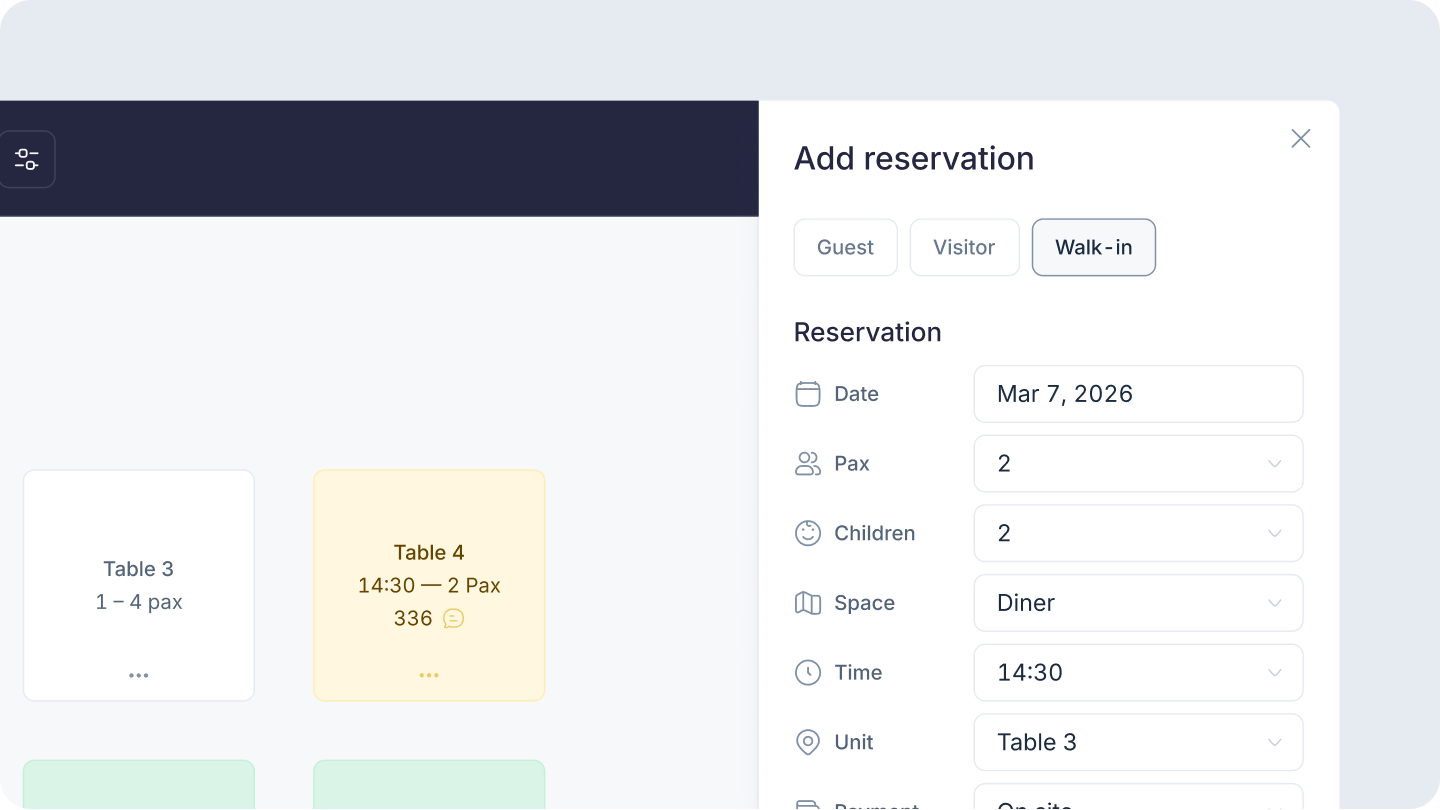
Running a hotel restaurant means managing constant changes in real time.
Guests arrive late. Pax changes. Walk-ins appear during peak hours. VIP tables need to be accommodated. And throughout all of this, teams still need a clear view of occupancy and availability.
Until now, many of these adjustments had to be handled manually or through multiple steps, creating friction during service.
With this update, managing them is now simpler and more direct, even during live service.
1. Manage changes directly during service
Restaurant operations don’t stop once a shift begins. Now, your team can handle everything inside the system:
- Register walk-ins instantly. Create reservations in seconds without entering guest details, reducing queues and keeping occupancy accurate.
- Update reservations during active shifts. Add bookings, modify Pax, or change reservation times even after a shift has started, keeping all changes tracked in real time.
- Override capacity when needed. Override limits to accommodate VIPs or special cases, without losing control of your availability.
2. See your entire operation at a glance
During service, decisions need to be immediate. Restaurants PRO now provides a clear, unified view of everything happening:
- See total occupancy instantly. View confirmed guests and tables versus total capacity instantly.
- Unified view of all spaces. Access all dining areas in one view, avoiding missed reservations due to filters.
- Highlight reservations to the floor plan. Select a booking and instantly locate its table, improving assignment speed and accuracy.
- Access guest notes without extra steps. View comments and internal notes directly on the map, without opening each reservation.
3. Send automatic reminders before each reservation
No-shows lead to empty tables and lost revenue, especially during high-demand shifts.
With this update, restaurants can now send automatic reminders before each reservation:
- Visitors receive email reminders
- Hotel guests receive push notifications or in-app alerts
- Reminders are configurable per service and sent in the guest’s language.
Why do these improvements matter?
These improvements allow restaurant teams to handle changes as they happen, maintain accurate capacity, and make faster decisions during service. The result is smoother operations, better guest experience, and higher occupancy.
Learn how to set up and use it
- How to set up the PRO booking system for a restaurant
-
How to manage restaurant bookings with the PRO booking system
Apply supplements for room service orders
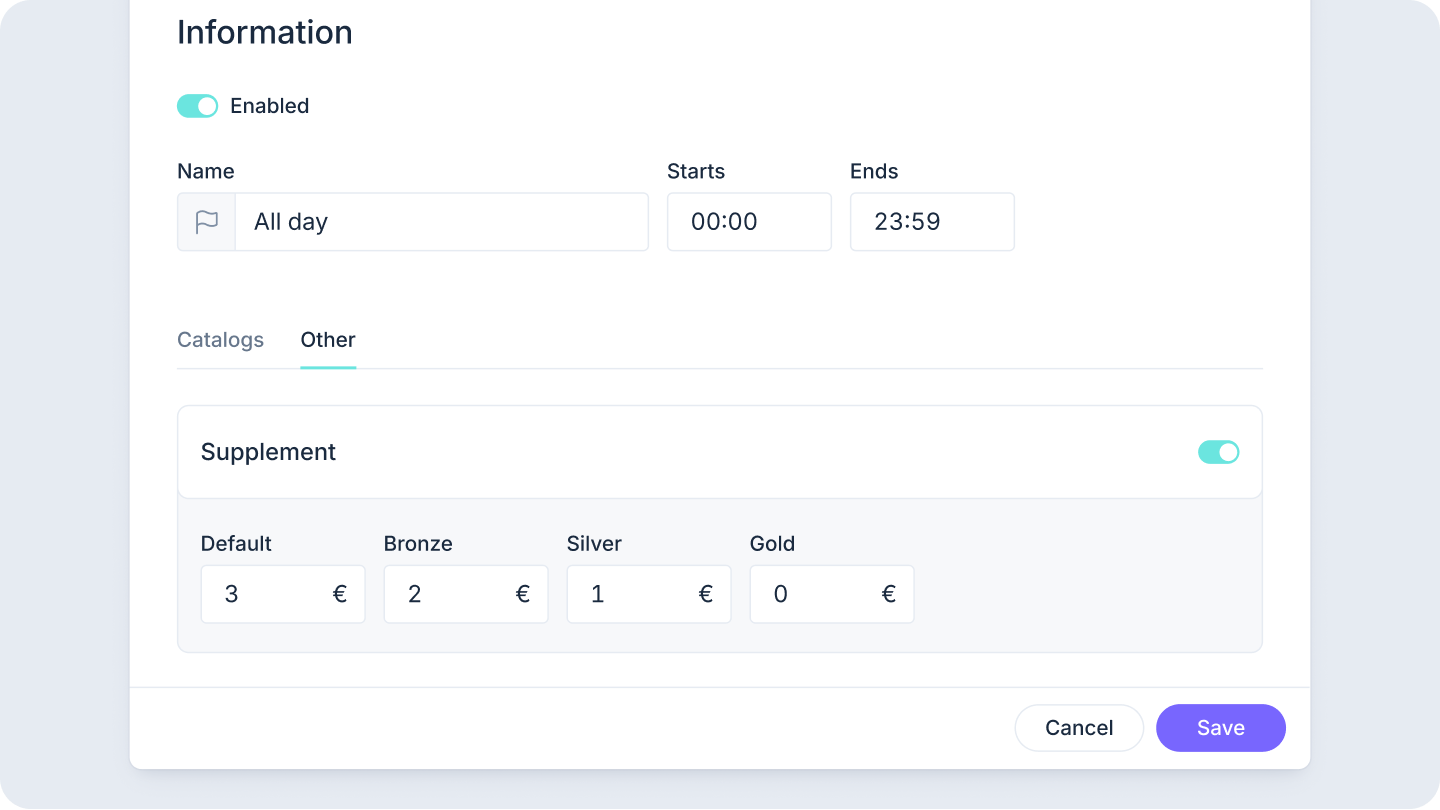
Room Service pricing often needs to adapt to operational reality, whether it’s late-night service, peak hours, or specific days.
Until now, applying these charges required manual adjustments.
With this update, hotels can now apply automatic supplements to Room Service orders directly from your service timetable.
- Set time-based rules (late-night surcharge, breakfast premium)
- Set day-based rules (weekend pricing, holiday rates)
- Let the system apply charges automatically
Why it matters?
Room Service pricing now adapts to real demand without adding operational complexity. Hotels can protect margins, standardize pricing rules across shifts, and eliminate manual work during busy periods.
Learn how to set up and use it
- How to set up the PRO ordering system for a restaurant
- How to set up the PRO ordering system for a room service
Let guests skip non-relevant survey questions
.jpg?width=744&height=285&name=Instant%20Feedback%20(1).jpg)
Not every question is relevant to every guest. Forcing answers leads to inaccurate data just to complete the survey.
With this update, hotels can now decide which questions are required and which are optional. Guests can skip questions that are not relevant to their experience, improving both the experience and the quality of the data.
- Choose which questions are required, and which guests can skip.
- Allow guests to skip non-relevant questions. If a guest didn't use the spa, they shouldn't have to answer spa questions.
- Analytics exclude skipped answers automatically. Your data stays clean. Skipped questions don't dilute your metrics.
Why it matters?
Better survey design leads to better decisions. By removing forced answers, you reduce noise in your data and get a more accurate view of guest experience, while also improving completion rates.
Learn how to set up and use it
Plan and update activities faster with a more intuitive calendar
.png?width=744&height=419&name=Activities%20(2).png)
Managing events and schedules shouldn't slow teams down.
We’ve redesigned key parts of the experience to make daily planning faster and more intuitive
1. Improved Activity List
The Activity List is now easier to navigate and manage. Teams can search activities by name, filter by type, reorder them with drag & drop, and duplicate existing ones to save time. Navigation has been improved, and activity locations are now visible directly in the list.
2. Better planning and scheduling experience
The calendar view has been redesigned to make planning more intuitive. Creating activities is now more accessible, and key information like location is visible both in the calendar and during activity creation, helping teams manage schedules more efficiently.
Why it matters?
These improvements reduce friction in day-to-day operations, making it easier for teams to manage activities, stay organized, and work faster, especially in hotels with a high volume of events.
Learn how to set up and use it
Designed for real hotel operations
This month's updates span restaurant service, room service operations, guest feedback collection, and activity planning. Each improvement addresses a specific operational challenge that hotel teams face daily.
The result is a platform that adapts to how hotels actually work.
Ready to see these updates in action?
